Sifting through a several hours-long DJ set, concert or podcast to find a specific portion is a pain. If you happen to store your tracks locally and use Poweramp as a music player on your Android device (probably something like 0.000001% of Earth’s population), there is a solution - or small hack, whatever you want to call it.
You can use the “LYRICS” ID3 tag to store chapters as if they were lyrics:
[00:00.0]Overture x The Bat Overture
[01:57.0]Ember x Emperor Waltz
[05:22.0]All Night x Éljen a Magyar
...
[71:19.0]Other Side
[77:33.0]No Tomorrow x The Baron
[97:13.0]Sientelo
I usually get chapter timestamps from YouTube comments, and I and use Mp3tag to edit ID3 tags (through Wine).
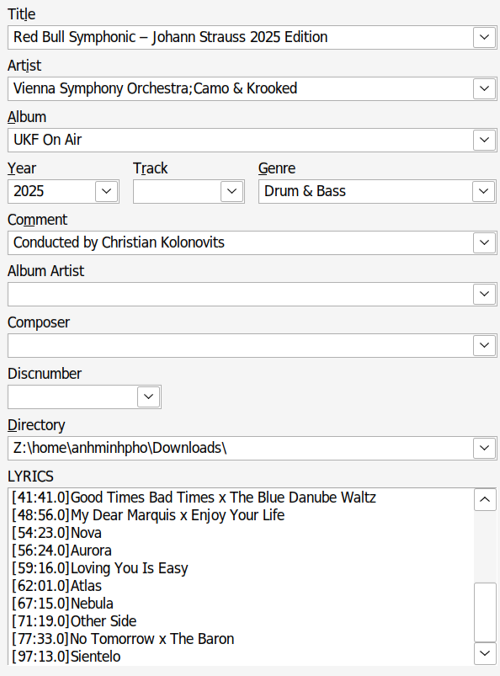 You must enable the “LYRICS” field in the settings first.
You unfortunately must stick to minutes and seconds to format the timestamps. For example: Poweramp will not recognize [01:11:19.0] as a timestamp. [71:19.0] will work, though. I’m not sure if this is a ID3 specification thing, or a Poweramp quirk. Here’s what it looks like in the app:
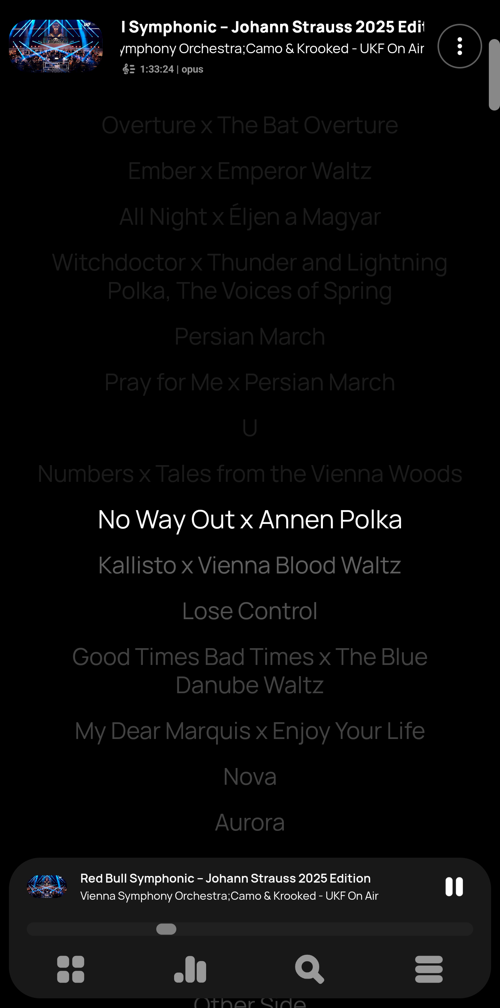 Each “chapter” is clickable!
Poweramp is IMHO the best music player for Android out there. There is a trial version on the PlayStore. The full version is available on there as well, but you can support the dev directly by purchasing it on the official website (no Google tax, and will run on degooggled devices).